ABB Terra AC
The ABB Terra AC can be integrated into CLEMAP load management via both Modbus TCP and OCPP.
Modbus TCP
Only ABB Terra AC charging stations that support Modbus TCP can be controlled by CLEMAP load management. It is recommended to check with the manufacturer whether the selected charging station model supports Modbus TCP.
The ABB Terra can currently only be controlled via LAN due to internal settings of the ABB charging station. Wi-Fi is not available.
- Update the ABB Terra to version ≥ 1.4.2 using the Android/iOS app TerraConfig or ChargerSync.
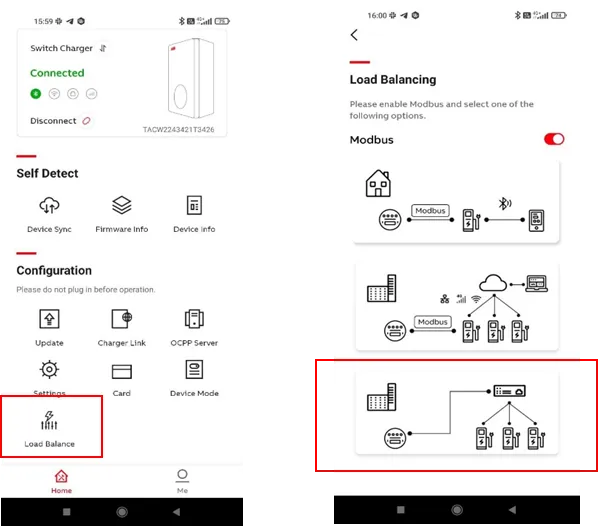
- Set the charging station to “Multiple chargers” mode using the TerraConfig app. This is not possible with the ChargerSync app.
- Note: The app communicates with the charging station via Bluetooth. The phone also requires an active data connection.
- Communicate with the charging station via Bluetooth to activate Modbus TCP.
- Deactivate LAN and Wi-Fi connections.
- Note: After LAN activation, the Modbus configuration is reset and must be configured again. To ensure that the Modbus connection works permanently, LAN and Wi-Fi connections must remain disabled.
- Configure a static IP address directly on the charging station in the TerraConfig app, including the network gateway. The values shown in the following image are only an example.
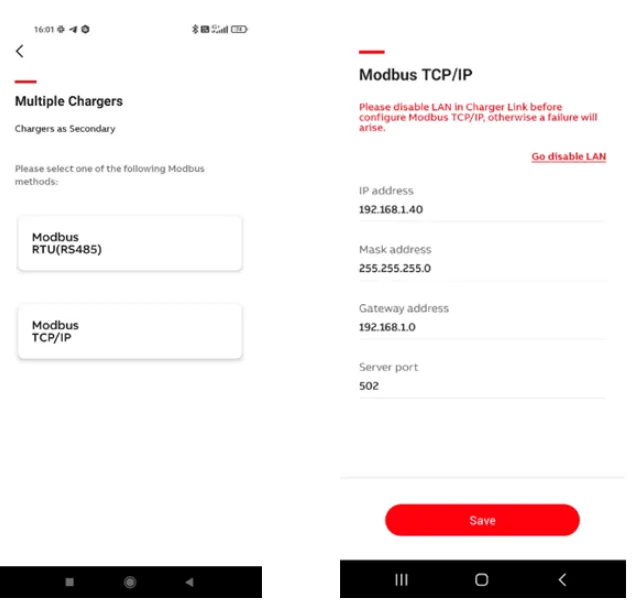
- Make sure that the CLEMAP device is connected to the network and that the IP address of the ABB station and port 502 have already been assigned. Otherwise, an error will occur on the ABB side.
We have noticed issues with the TerraConfig app. If your configuration is not saved, please update the app or use another device. Android occasionally causes difficulties; iOS usually works without issues.
OCPP
Please read first: OCPP Connection of a Charging Station with CLEMAP
Tested combination: ABB Terra AC Wallbox CE + OCPP 1.6 + Longship.io as OCPP backend.
For the authorization of charging sessions via ecarup, free charging must be disabled on the charging station. This is the only way to ensure that the charging sessions are released via ecarup.
- Make sure that your CLEMAP Edge Device and the ABB Terra AC charging station are in the same LAN.
- Find the IP address of your CLEMAP Edge Device, for example using an IP scanner tool.
- Download the ABB TerraConfig app, connect to the ABB Terra AC charging station via Bluetooth, and install the latest firmware.
- Go to “Configure a charger” and select the appropriate connection type: Wi-Fi, 4G, or Ethernet.
- Set the OCPP server as follows:
Direct connection:ws://<Clemap-Edge-Device-IP>:7050
Proxy connection:ws://<Clemap-Edge-Device-IP>:8050
- Note the OCPP Identifier. For ABB, this is usually the serial number of the wallbox. This identifier is then used in FLOEM when configuring the charging station. See: OCPP Connection of a Charging Station with CLEMAP
- To save the configuration, press “Confirm Configuration”.