Janitza
Integrating Janitza meters with CLEMAP
CLEMAP supports reading data from Janitza meters (e.g. UMG 96RM-E, UMG 604, UMG 512) via Modbus TCP. The measurement data is transferred directly from the Janitza device to the CLEMAP platform.
Requirements
For the integration to work, the following points must be fulfilled on the Janitza device:
- Communication protocol: Modbus TCP active
- Modbus slave address: must be set to 1
- Network: The Janitza device requires a fixed IP address and must be reachable from the network in which the CLEMAP device is also operated
- Port: Standard Modbus TCP port 502 must be reachable (open firewall if necessary)
Checking the settings on the Janitza device
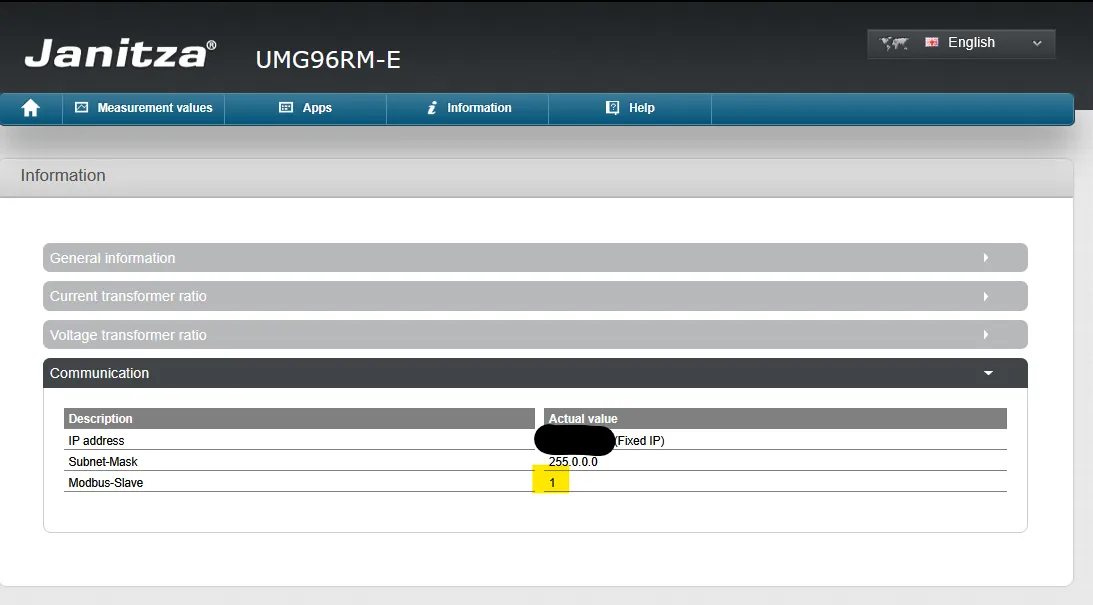
The configuration can be verified directly in the web interface of the Janitza device:
- Open the Janitza device's web interface in your browser (via the IP address)
- Select the menu Information
- Expand the section Communication
The following values must be visible:
- IP address – fixed IP address
- Subnet mask – matching the network
- Modbus slave – must be set to 1
Integration by CLEMAP
The integration of the Janitza device into the CLEMAP platform is carried out by CLEMAP. Self-configuration by the customer is not provided.
Please contact us with the following information:
Information | Example |
|---|---|
Model type of Janitza device | e.g. UMG 96RM-E |
IP address of the device | e.g. 192.168.1.50 |
Modbus slave address | 1 |
CLEMAP will then take over the integration and configuration on the platform. After successful integration, the measurement data is available in FLOEM.
Contact
CLEMAP Support
- E-mail: [email protected]
- Phone: +41 44 548 20 61
- Web: clemap.com