Raedian Gemini
1) Use the RAEDIAN Install app in your phone.
1.1) Go to Gemini and scan your station:

1.2) Once conncetcted via Bluetooth, configure the OCPP Profile:

1.3) Create a new Profile setting the URL with the CLEMAP device IP.
For the sensor_ip_address you have to do a scan in the local network and find it
For a Normal connection, enter the clemap OCPP server url: ws://[sensor_ip_address]:7050/
For a Proxy connection, you need to access a different port, so the url is: ws://[sensor_ip_address]:8050/

Then connect:

Confirm and Disconnect once succesful:

3.1) For a proxy connection, you have to add the identifier and the additional backend URL at the chargers configuration in FLOEM.
For a Proxy Connection with eCarUp, please first make a connection directly with the eCarUp backend and restart. After the charger appeared in the eCarUp backend, change the ocpp_url in the station to ours (ws://[sensor_ip_address]:8050/) and restart the charger. Else your charger might not appear in their backend.
There is an issue with the BootNotification we are working to solve. Thank you!
3.2) For a normal connection, you just add the identifier:
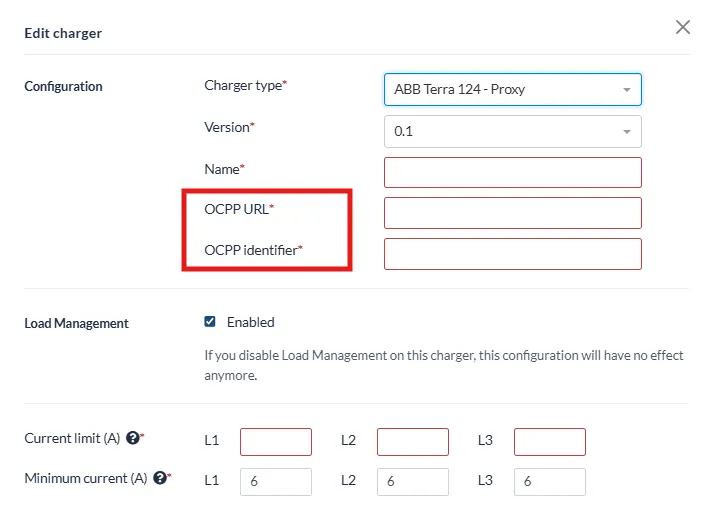
The identifier is important, if it does not match to the identifier provided in the chargers configuration, the connection will be rejected.
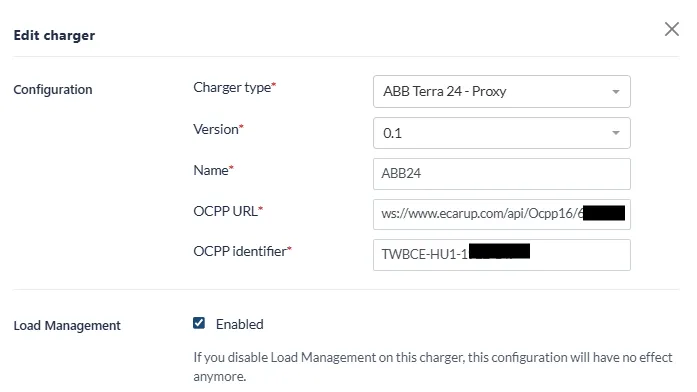
4) Here one example of a client of us, who uses a proxy with eCarUp:
Happy Charging!